
WHAT IS A COMPUTER & HOW DO WE USE COMPUTERS IN BUSINESS ORGANIZATIONS?
Topics Covered:
- Components of a computer system, hardware, software, etc.
- Computer operations, input, output, processing, storage, etc.
- Classes of computers and their uses – PCs and mobile devices, servers, embedded computers, etc.
In today’s business world, computers are at the center of nearly every organizational process. Whether you are working with customer transactions, financial data, supply chain management, or marketing analytics, computers provide the foundation for storing, processing, and sharing information. To understand how businesses use computers, it is important to first understand what a computer is, how it operates, and the different forms it can take.
2.1 Components of a Computer System
A computer system is more than just a physical machine—it is a combination of hardware, software, data, and people working together to accomplish tasks.
- Hardware: The physical components of the system. This includes the central processing unit (CPU), memory, storage devices, input devices (keyboard, scanner, touchscreen), and output devices (monitor, printer, speakers).
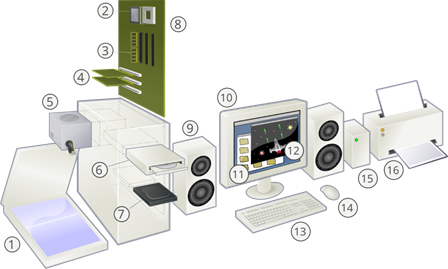
Figure 2.1: See if you can label each of the 16 components of this computer system
(answers are given at the end of this chapter).
Table 2.1: Generations of Computer Hardware
| Generation | Key Technology | Characteristics | Business Impact |
| First (1940s–1950s) | Vacuum tubes | Very large machines, costly, required specialized operators | Used in government and military for complex calculations (e.g., code-breaking). |
| Second (1950s–1960s) | Transistors | Smaller, faster, more reliable | Allowed businesses (banks, insurance firms) to begin using computers for record keeping. |
| Third (1960s–1970s) | Integrated Circuits (ICs) | More powerful, smaller, cheaper | Opened the door for corporate data processing in accounting and payroll. |
| Fourth (1970s–1990s) | Microprocessors | Personal computers became affordable | Businesses adopted PCs for spreadsheets, word processing, and office productivity. |
| Fifth (1990s–Present) | Networking, AI, Cloud, Mobile | Miniaturization, connectivity, smart devices | Enabled global communication, e-commerce, cloud storage, and data analytics in business. |
- Software: The instructions that tell the hardware what to do. Software can be divided into:
- System software – operating systems (like Windows, macOS, Linux) that manage hardware resources.
- Application software – programs designed to perform specific tasks, such as word processing, spreadsheets, accounting systems, or customer relationship management (CRM) tools.

Figure 2.2: Workers in nearly every discipline interact with both system software and application software on a daily basis.
Table 2.2: Generations of Computer Software
| Generation | Key Technology | Characteristics | Business Use |
| First (1940s–1950s) | Machine Language (binary code) | Direct hardware instructions, extremely difficult for humans to use | Used only by scientists and engineers for specialized calculations. |
| Second (1950s–1960s) | Assembly Language | Symbolic coding (mnemonics), easier than binary | Businesses began using custom programs for payroll and inventory. |
| Third (1960s–1970s) | High-Level Languages (COBOL, FORTRAN) | English-like syntax, portable across machines | COBOL revolutionized business by automating accounting, finance, and HR systems. |
| Fourth (1970s–1990s) | 4GLs, Databases | Query languages (SQL), report generators, GUIs | Businesses built management information systems and decision support systems. |
| Fifth (1990s–Present) | AI, Object-Oriented, Cloud-based software | Natural language, intelligent systems, mobile apps | CRM, ERP, data analytics, cloud services, and AI-driven business insights. |
- Data: The raw facts and figures that are processed into meaningful information. In business, data might include customer names, sales figures, or transaction histories.
- People: Often overlooked, people are critical to any computer system. Business professionals, IT specialists, managers, and end-users all rely on computers to achieve organizational goals.
Computers in organizations exist as socio-technical systems, where people and technology interact. For example, an inventory management system is only valuable if employees know how to input data correctly, managers understand how to interpret reports, and decision-makers act on the information.
2.2 Computer Operations
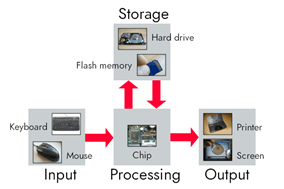
Figure 2.3: The four basic functions of a computer system.
At their core, all computers perform the same basic functions, often summarized as input, processing, storage, and output.
- Input – The process of entering data into a computer system. Examples: typing sales orders, scanning barcodes at checkout, or uploading a customer survey.
- Processing – The CPU manipulates, calculates, or organizes the input into useful information. In business, this might mean calculating payroll taxes, analyzing sales trends, or determining the most efficient shipping route.
- Storage – Data and information must be stored for later use. Businesses use a variety of storage solutions, from local hard drives to enterprise cloud storage systems. Storage can be temporary (RAM) or permanent (databases, cloud servers).
- Output – The delivery of processed information in a usable form. Examples: an invoice printed for a customer, a financial report displayed on a screen, or a notification sent to a mobile phone.
All of these operations are essential to business efficiency. For example, an airline reservation system uses input (customer booking request), processing (checking seat availability), storage (updating the flight database), and output (confirmation ticket) to complete a transaction in seconds.
More about Storage
Metric prefixes are given in powers of ten (decimal). Looking at computer storage in terms of these metric units is illustrated in Table 2.3.
Table 2.3: Decimal Prefixes
| Prefix | Symbol | Power of 10 | Bytes | Example in Computers |
| kilo | kB | 10³ | 1,000 bytes | A text file might be a few kB in size. |
| mega | MB | 10⁶ | 1,000,000 bytes | A typical MP3 song is ~3–5 MB. |
| giga | GB | 10⁹ | 1,000,000,000 bytes | A standard movie download is ~1–4 GB. |
| tera | TB | 10¹² | 1,000,000,000,000 bytes | A modern SSD may hold 1–4 TB. |
| peta | PB | 10¹⁵ | 1 quadrillion bytes | Large data centers hold PBs of data. |
| exa | EB | 10¹⁸ | 1 quintillion bytes | Global cloud storage services work at this scale. |
Computers store data using powers of two (binary). Many computer manufacturers, however, still market the data using decimal as a marketing strategy to make the storage devices appear larger. Table 2.4 breaks it down using binary prefixes such as KiB, MiB, GiB, and TiB.
Table 2.4: Storage Capacities for Common Devices
| Component / Context | What It Really Uses | How It’s Marketed / Reported | Example |
| RAM (memory) | Binary (powers of 2) – always exact multiples of 2³⁰ | Marketed as “GB” but actually GiB | A “16 GB RAM” stick = 16 GiB = 17,179,869,184 bytes |
| Cache / Registers | Binary (powers of 2) | Reported in KB/MB (actually KiB/MiB) | L1 cache: 512 KiB (really 524,288 bytes) |
| Hard Drives (HDDs) | Internally binary, but marketed in decimal | Manufacturer uses SI (10³) | A “1 TB” drive = 1,000,000,000,000 bytes, but OS shows ~931 GiB |
| Solid-State Drives (SSDs) | Internally binary, marketed in decimal | SI prefixes on box, OS shows binary | A “2 TB SSD” → OS reports ~1.81 TiB |
| USB Flash Drives / SD Cards | Internally binary, marketed in decimal | SI prefixes on box, binary in OS | A “64 GB flash drive” → ~59.6 GiB |
| Operating Systems (Windows, Linux) | Binary internally | Report in binary values but often label with decimal symbols (“GB”) | “500 GB” HDD shows as “465 GB” in Windows (actually 465 GiB) |
| macOS (since Snow Leopard) | Binary internally | Reports in decimal (to match marketing) | A “500 GB” drive shows as “500 GB” in Finder |
2.3 Classes of Computers and Their Uses
Not all computers are alike. In business, different classes of computers serve different roles, depending on the industry and organizational needs.
- Personal Computers (PCs) and Mobile Devices
- Use: PCs, laptops, tablets, and smartphones are used daily by employees for productivity tasks (spreadsheets, presentations, communication). Mobile devices have expanded business operations beyond the office, enabling remote work, sales on the go, and instant communication with clients.
- Industry Examples:
- Finance: Accountants use spreadsheets to prepare budgets and financial models.
- Healthcare: Doctors use tablets during patient rounds to review medical charts.
- Retail: Sales staff use mobile devices to check inventory availability while assisting customers.
- Servers
- Use: Servers are powerful machines that manage resources for multiple users. They host company websites, store databases, support email systems, and run enterprise software applications. For example, an ERP (Enterprise Resource Planning) system may be hosted on a company server.
- Industry Examples:
- E-commerce: Servers process thousands of online transactions every minute for companies like Amazon.
- Hospitality: Hotel chains use servers to manage reservations across hundreds of properties.
- Education: Universities host learning management systems (LMS) on servers to deliver courses online.
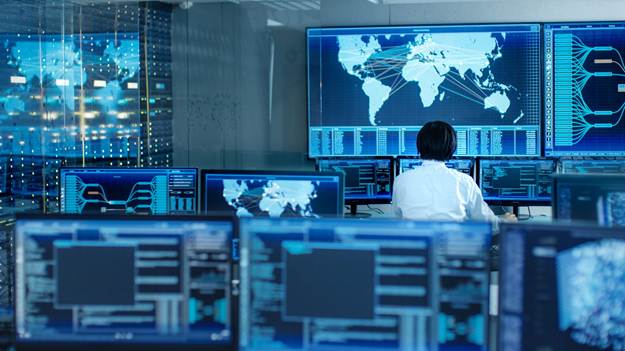
Figure 2.4: Networks often combine computers from multiple classes.
- Mainframes and Supercomputers
- Use: Large organizations rely on mainframes for processing massive amounts of data, such as banking transactions. Supercomputers, while less common, are used in specialized industries for complex simulations and analytics.
- Industry Examples:
- Banking: Mainframes handle millions of ATM and credit card transactions securely every day.
- Healthcare Research: Supercomputers analyze genetic data to speed up drug discovery.
- Insurance: Mainframes calculate risk models and process claims for large customer bases.
- Embedded Computers
- Use: Embedded systems are built into products to perform dedicated functions. In business, these might appear in manufacturing equipment, automobiles (fleet tracking systems), medical devices, or point-of-sale machines. They are often invisible to users but critical to operations.
- Industry Examples:
- Manufacturing: Embedded systems in robotic arms assemble cars with precision.
- Retail: Point-of-sale terminals in stores process credit card payments securely.
- Logistics: GPS-enabled embedded systems track delivery trucks in real time.
Chapter Summary
Computers are more than machines—they are integral tools that support every function in business organizations. By understanding their components (hardware, software, data, people), their operations (input, processing, storage, output), their classes (PCs, servers, embedded systems, etc.), and their historical generations, business students can better appreciate how information systems support decision-making, improve efficiency, and create competitive advantages in today’s digital economy.
Review Questions
2.1. Define the four main components of a computer system. Why are people often considered the most important part?
2.2. Explain the difference between system software and application software. Provide two business examples of each.
2.3. List and describe the four primary computer operations (input, processing, storage, output) and give a business example for each.
2.4. Compare personal computers and servers in terms of their role in a business organization.
2.5. How did the introduction of microprocessors (4th generation hardware) change the way businesses operate?
2.6. Imagine your university bookstore is moving to a fully online sales platform. Which classes of computers (PCs, servers, mobile devices, embedded systems) would be involved in this project, and what role would each play?
2.7. A hospital is considering whether to invest in cloud storage or continue to use on-site servers for patient records. What are the advantages and disadvantages of each option from a business perspective?
2.8. How do embedded computers contribute to customer experiences in retail and logistics? Provide at least two specific examples.
Projects:
2.1. Hardware Generations Timeline: Create a timeline that illustrates the five generations of computer hardware. Include one example of how each generation has influenced business practices.
2.2. Software in Action: Interview a small business owner or manager about the types of software they use. Write a one-page summary explaining how system software and application software help the business operate.
2.3. Analyzing Business Operations: Choose a company you are familiar with (e.g., Starbucks, FedEx, Netflix). Identify examples of input, processing, storage, and output in their daily business operations. Present your findings in a short report or presentation.
2.4. Industry Application Case Study: Select one industry (finance, healthcare, retail, or logistics) and research how different classes of computers are used within it. Write a two-page analysis discussing how these technologies provide competitive advantages.
Answers:
Figure 2.1 – Parts of the computer system
1 Scanner
2 CPU (Microprocessor)
3 Main memory (RAM)
4 Expansion cards
5 Power supply unit
6 Optical disc drive
7 Hard disk drive (HDD)
8 Motherboard
9 Speaker
10 Monitor
11 System software
12 Application software
13 Keyboard
14 Mouse
15 External hard disk
16 Printer