
INFORMATION SYSTEMS ANALYSIS & DESIGN
Topics Covered:
- System Analysis and Design Methods
- Business Process Management
- Enterprise Systems
“Computer programs are the most intricate, delicately balanced and finely interwoven of all the products of human industry to date. They are machines with far more moving parts than any engine: the parts don’t wear out, but they interact and rub up against one another in ways the programmers themselves cannot predict.”
— James Gleick, What Just Happened: A Chronicle from the Information Frontier (2002)
7.1 Systems Analysis and Design
Nearly every business is managed with the help of computer-based systems. These systems are often critical to every aspect of the business. As the size of the business increases, the reliance upon these systems also increases.
As you can imagine, designing, implementing, and managing large, complex software systems requires a set of very specialized knowledge skills. Studies have shown that failures are often the result of building the wrong kinds of systems. These failures are the result of poor analysis.
Analysis involves the study of the requirements for a system and making sure that they align with the needs of the business. It is important to make sure that requirements are:
- Clear: there is a shared understanding among the project stakeholders
- Consistent: certain requirements do not contradict other requirements
- Complete: every effort has been made to gather and record all relevant requirements
This is the job of the analyst who has 1) software development experience and 2) understands the needs of the business.
Design is the process of organizing the system requirements into a form which can be passed along to developers who then use the design to write the code. Designers usually have a strong background in writing and testing code. The best designers have experience with many different design patterns and programming languages.
7.1.1 Waterfall & The SDLC
People discovered, very early on, that programming requires significant thought and planning. One of the first approaches to the problem of “how to build software” was called the Waterfall Methodology due to the appearance of deliverables that “flow” from one step to the next.
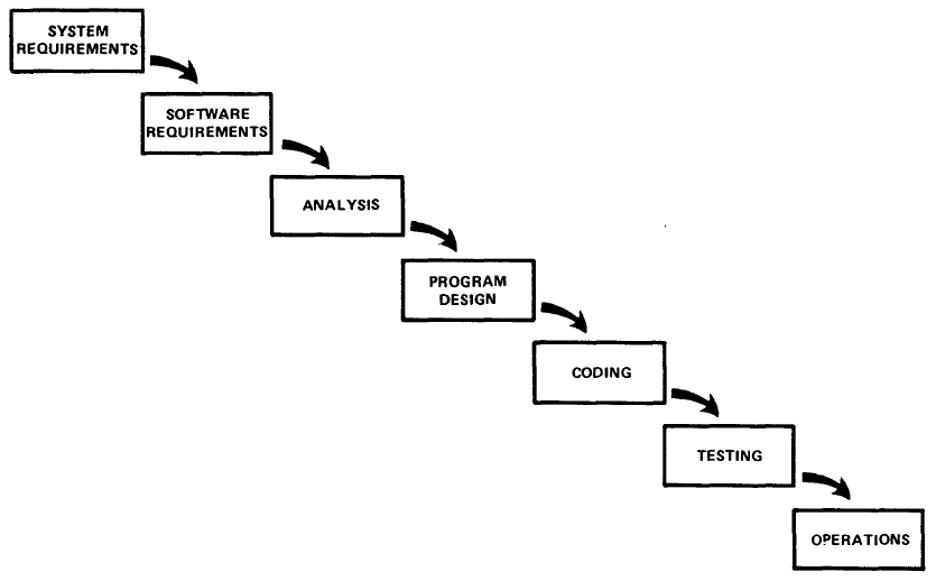
Each of these steps requires specialized skills and experience in order to produce a successful software system. People with the ability to perform one of these steps can often perform some of the adjacent tasks, but rarely will anyone be responsible for the entire process. As the size of the enterprise grows, the specialization and focus narrows and teams are often assigned to a single step in the process.
However, each step can produce issues that can impact previous steps. For example, as a programmer is writing code it may be discovered that the design has a flaw. This may be due to a problem with the analysis that points to missing software requirements. Each step must have feedback from the next step in the chain. Therefore, it was immediately recognized that iteration was required to make the software development process successful. This approach to system development is sometimes called the Software Development Life Cycle (SDLC).
Definition: iteration – the use of feedback in order to improve the deliverables of a process step
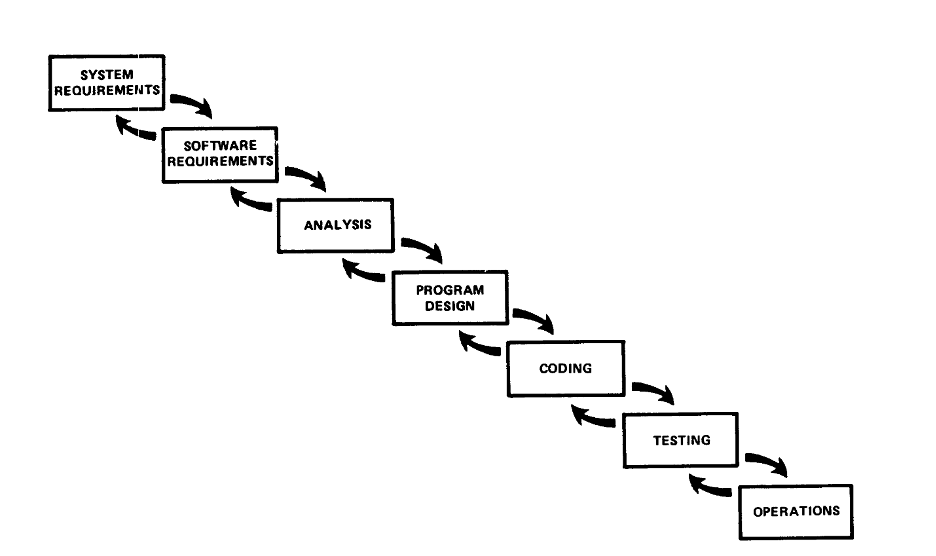
This iterative approach was not always followed in the early decades of computers, which resulted in a new emphasis on iteration that began in the 1990’s.
7.1.2 The Agile Manifesto
A group of industry experts, book authors, consultants, and other “thought leaders” met at a conference in 2001 and created the Manifesto for Agile Software Development.
We are uncovering better ways of developing software by doing it and helping others do it. Through this work we have come to value:
Individuals and interactions over processes and tools
Working software over comprehensive documentation
Customer collaboration over contract negotiation
Responding to change over following a plan
That is, while there is value in the items on the right, we value the items on the left more.
Source: https://agilemanifesto.org/
This brief statement captured the spirit of the Agile Movement in software development that has persisted down to the present day.
7.1.3 eXtreme Programming (XP)
One way to approach development is to involve the stakeholders directly in the process. Kent Beck and others developed a collection of processes that produced systems very quickly by having the customer (or primary stakeholder) on-site during system development. The process is called eXtreme Programming (XP) and based on the following principles.
| Principle | Description |
| Rapid Feedback | Get feedback, interpret it, and put what is learned back into the system as quickly as possible. |
| Assumed Simplicity | Focus on what is necessary at the moment instead of planning for the possibility of future reuse. |
| Incremental Change | Implement small, manageable changes rather than large, sweeping modifications. |
| Embracing Change | Expect changes to requirements, adapting the project as needed based on customer input. |
| Quality Work | Always create quality work. Knowingly creating substandard deliverables destroys the morale of the team. |
Table 7.1: Agile Principles
7.1.4 Scrum
Scrum is an agile framework used to manage the software development processes. Unlike most other approaches, Scrum is entirely focused on the management of the software development process. Scrum has no suggestions related to how to write code, but only how to manage the project.
Scrum was designed to address problems that commonly occur in software development organizations. For example, distractions that prevent developers from writing code such as being called away onto other projects, being interrupted by other priorities, and the chaos caused by constantly changing requirements.
A scrum project is composed of short Sprints (usually two to six weeks in length) in which software requirements are chosen at the start, the code is developed during the sprint and then demonstrated to everyone at the end.
The following rules are usually in force on Scrum Teams:
- During the sprint’s daily stand-up “Scrum Meetings”, only the “pigs” (developers) are allowed to talk. The term “pigs” came from this joke:
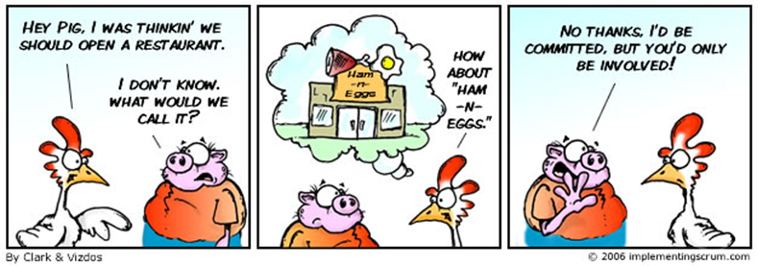
Only those working on the project on a daily basis throughout the sprint have a voice.
2. No additional requirements or changes in priorities during the sprint.
3. No interruptions by management (e.g., external meetings, side projects, etc.).
Key Elements of Scrum
- Scrum Team:
- Product Owner: Defines and prioritizes the list of features to be built. This is called the Product Backlog.
- Scrum Master: Facilitates the Scrum process by helping the team follow Scrum practices, removing obstacles, and promoting a productive environment.
- Developers: A small cross-functional group (usually less than ten) responsible for delivering an Increment of the product during each Sprint.
- Artifacts:
- Product Backlog: A prioritized list of features, improvements, and bug fixes required for the product. The work on the backlog is completed in a series of sprints.
- Sprint Backlog: A selection of items from the product backlog that the team commits to completing during a sprint (two to six weeks).
- Increment: The sum of all completed product backlog items during a sprint, representing a potentially shippable product. Each sprint produces a new version of the system.
- Activities:
- Sprint: A time-boxed iteration (lasting typically two to six weeks) during which teams work to complete the sprint backlog.
- Sprint Planning: A meeting at the beginning of each sprint where the team plans what work will be added to the Sprint Backlog based on the Product Backlog that is prioritized by the Product Owner.
- Daily Scrum: A brief, daily stand-up meeting (15 minutes or less) for team members to discuss 1) progress, 2) plans for the day, and 3) any obstacles faced.
- Sprint Review: At the end of the sprint, developers present the completed work to the Scrum Team and as well as other stakeholders to gather feedback.
- Sprint Retrospective: A reflective meeting where the team discusses what went well, what didn’t, and how to improve the next sprint.
Scrum is an effective framework for dynamically managing software projects, allowing teams to respond to changing requirements and deliver value incrementally. Since Scrum is focused on management, it can be used along with XP or any other software methodology.
7.2 Business Process Management
Business Process Management (BPM) dates to at least the early 1900s when computers were mechanical and not yet digital. In fact, in those days a computer was a person who calculated mathematical results by hand. Therefore, BPM can be applied without computers, but no business owner today would even think of doing such a thing.
BPM is all about viewing the business as a collection of processes that can be managed and improved. Enterprise-wide 1) computer systems are employed along with 2) statistical process control principles to improve the quality and efficiency of the business. This field has generated many approaches to management including:
- Continuous improvement
- Total Quality Management (TQM)
- Six Sigma
- Business Process Reengineering (BPR)
- Enterprise Resource Planning (ERP) Systems
- Robotics Process Automation
Definition of BPM (see Jeston):
“A management discipline focused on using business processes as a significant contributor to achieve an organization’s objectives through the improvement, ongoing performance management, and governance of essential business processes.”
7.2.1 ERP Systems
Enterprise Resource Planning (ERP) systems are designed to collect and make available all of the information necessary to improve the operational efficiency of the enterprise. These are very large and modular systems that can be expanded as the needs of the business change.
The modules may include support for finance asset management, materials management, product management, quality management, maintenance management, sales and distribution, human resource management, customer relationship management, and many others.
Companies like Microsoft, Workday, Oracle, and SAP provide systems that enable businesses to manage all of the areas mentioned above. Cloud-based ERP software solutions are the most popular and are expected to grow quickly in the coming years.
7.2.2 CRM Systems
Customer Relationship Management (CRM) systems are software solutions designed to help organizations manage their interactions and relationships with current and potential customers. The main goal is to improve business relationships, enhance customer satisfaction, and drive sales growth.
Key Functions of CRM Systems
- Contact Management: Centralizes customer information, including contact details, communication history, and social media profiles.
- Sales Management: Tracks sales leads, opportunities, and performance metrics.
- Customer Service Support: Manages customer inquiries, complaints, and service requests.
- Marketing Automation: Supports targeted marketing campaigns and tracks their effectiveness.
- Analytics and Reporting: Analyzes customer data to derive insights and support decision-making.
Key Features of CRM Systems
| Feature | Description |
| Centralized Database | Provides a single source of customer information accessible to all relevant teams. |
| Lead Scoring | Prioritizes leads based on their likelihood to convert into paying customers. |
| Pipeline Management | Visualizes sales processes and stages for better tracking. |
| Salesforce Automation | Automates repetitive tasks, such as follow-ups and reminders. |
| Customer Segmentation | Classifies customers based on demographics, behavior, or purchase history for targeted marketing. |
Benefits of CRM Systems
- Enhanced Customer Engagement: Provides a detailed view of customer interactions, aiding personalized communication.
- Increased Sales Efficiency: Streamlines the sales process and helps identify high-value leads.
- Improved Customer Retention: Proactive communication and service lead to higher customer loyalty.
- Data-Driven Insights: Offers reports and analytics that help businesses make informed decisions regarding customer strategies.
Drawbacks of CRM Systems
- Complex Setup: Implementing a CRM can be time-consuming and require significant resources and training.
- User Adoption: Employees may resist changing from existing processes, which can hinder effectiveness.
- Information Quality: Inaccurate or incomplete data can lead to ineffective customer strategies.
In summary, CRM systems are critical for organizations seeking to build and maintain strong customer relationships, improve sales, and enhance overall customer satisfaction.
7.2.3 SCM Systems
Supply Chain Management (SCM) systems are tools designed to optimize and manage the flow of goods, services, and information from source to destination. These systems enable the coordination between different entities involved in the production and distribution of products, from suppliers to manufacturers to customers.
Key Functions of SCM Systems
SCM systems encompass a range of functions, including:
- Planning and Forecasting: Predicting customer demand and planning inventory accordingly.
- Sourcing: Managing relationships with suppliers, including procurement and contract management.
- Manufacturing: Overseeing production processes, scheduling, and quality control.
- Logistics and Distribution: Coordinating transportation, warehousing, and inventory management.
- Order Management: Handling customer orders from placement to fulfillment.
Key Features of SCM Systems
| Feature | Description |
| Real-Time Tracking | Offers visibility into inventory levels and shipment statuses. |
| Collaboration Tools | Facilitates communication among suppliers, manufacturers, and distributors. |
| Data Analytics | Provides insights for data-driven decision-making regarding inventory and logistics. |
| Demand Planning | Assists in predicting customer demand and adjusting supply accordingly. |
| Automated Workflows | Streamlines processes through automation to increase efficiency. |
Benefits of SCM Systems
- Cost Reduction: Optimizes inventory levels and reduces excess stock, lowering holding costs.
- Improved Efficiency: Enhances operational workflows by automating routine tasks.
- Growth Opportunities: Enables quicker responses to market changes and customer needs.
- Better Customer Service: Improves order fulfillment processes, leading to higher customer satisfaction.
- Expanded Sourcing Opportunities: Suppliers who use SCM are more likely to investigate new opportunities.
Drawbacks of SCM Systems
- Complex System Integration: SCM systems need to seamlessly integrate with other enterprise systems, which can be challenging.
- Information Quality: Inaccurate or outdated data can impair decision-making.
- Training: Staff may require training and support to adapt to new processes and technology.
In summary, SCM systems play a crucial role in managing the complexities of supply chains, ensuring efficiency and enhancing coordination among various stakeholders.
7.3 Enterprise Systems
Enterprise Systems encompass all the computing resources of a business or enterprise. Therefore, the ERP systems and BPM systems introduced earlier are but smaller parts of the broader collection of systems that are used to run large businesses and enterprises.
Most large businesses will purchase some systems from software companies. However, many organizations find that at least one portion of the business is so specialized that no off-the-shelf software solutions exist. In such cases, the company will either hire its own software developers or contract the custom development to companies that specialize in such work.
Regardless of the source of the systems, modern companies rely upon enterprise software to effectively manage and optimize their products and services.
Chapter Summary
Systems that enable organizations to intelligently manage their operations are crucial for a company’s success. A fundamental question is whether to buy enterprise systems from vendors like Microsoft, build custom systems in-house or opt for some combination of the two choices.
Review Questions
7.1 Analysts are responsible for the three C’s. What are they?
7.2 What does a system designer do?
7.3 What is iteration and why is it important?
7.4 What is a Sprint? How long is it? What does it involve?
7.5 What are the three roles in Scrum? What is each responsible for?
7.6 What are the two things that BPM uses to improve quality and efficiency?
7.7 What are the benefits of CRM systems?
7.8 What does a SCM system do?
Projects
7.1. Requirements Gathering: As a team, brainstorm a software application that you would find interesting and list the requirements for the system.
7.2. Requirements Analysis: Given a set of requirements, make sure that the requirements are “good.”
7.3 Daily Scrum Meeting: Divide into teams of 10 or less and conduct a stand-up scrum meeting. Go in a circle, giving each person an opportunity to discuss the three allowed topics only. The goal should be to finish in 15 minutes or less.
7.4 ERP Components: Research the offerings of various vendors of software components in the ERP space (e.g., Oracle, SAP, etc.). Look for ERP modules. How are these modules named? How many are there? How many are in common among the vendors?
Credits:
Portions of chapter 7 were contributed and/or improved by Duck.ai
Figure 7.1: Managing the Development of Large Software Systems, Dr. Winston W. Royce, 1970, Figure 2
Figure 7.2: ibid, Figure 3
eXtreme Programming explained, Kent Beck, 2000
The Scrum Guide, November 2020, Schwaber & Sutherland https://www.scrum.org/resources/scrum-guide
Business Process Management: Practical Guidelines to Successful Implementations, Fifth Edition Routledge © 2022, John Jeston